 Kai
Tool groups
Your own named sets of servers and tools, to turn on in one click.
A tool group is a named set of MCP servers, each with all of its tools or only some. Turn a group on in a chat's Tools menu to turn on everything in it. Groups are yours: other members don't see them. Agents can also be limited to groups.
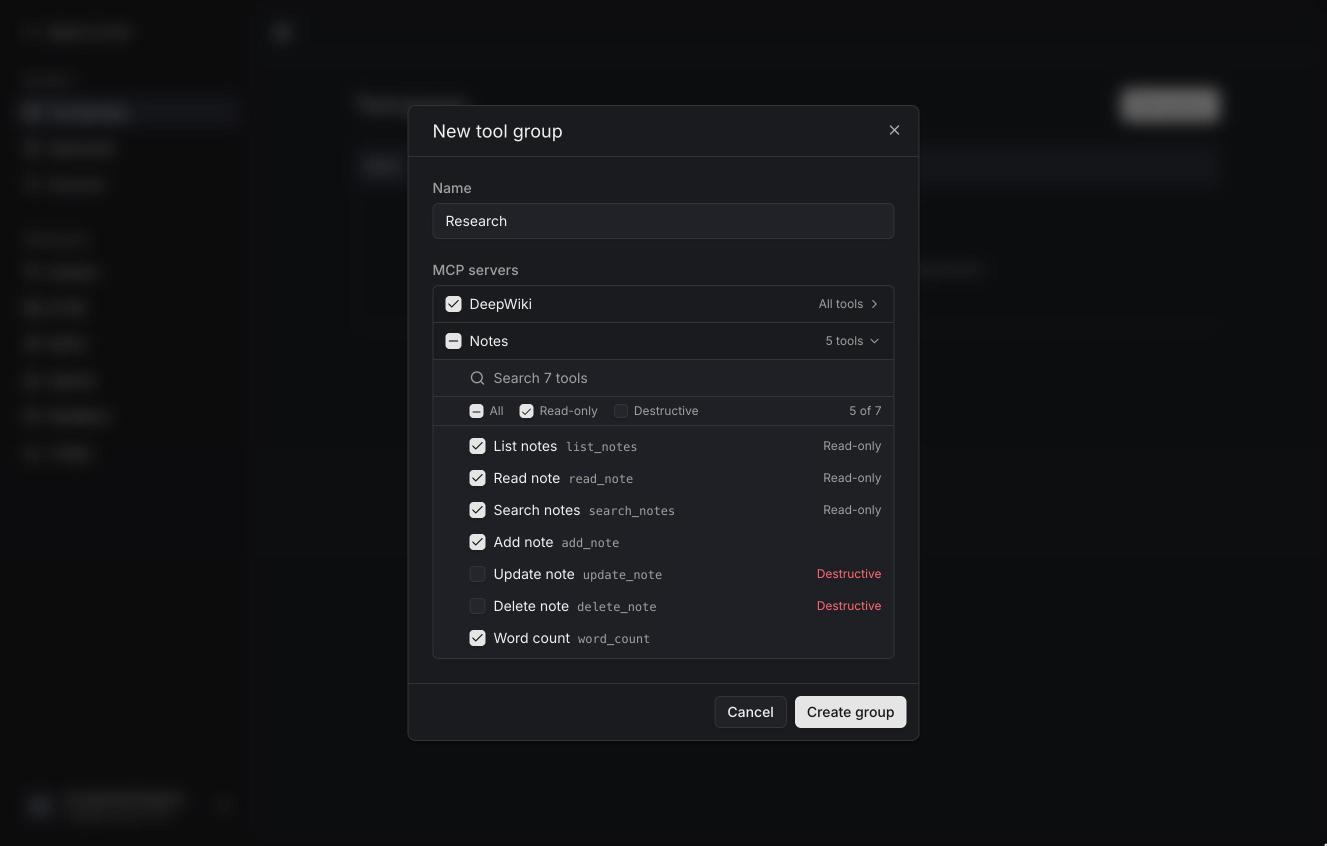
Settings → Tool groups → New group.
-
Name the group.
-
Tick the servers it includes. A ticked server comes with all its tools, including ones it adds later.
-
To narrow a server down, open its tool list. Search it, tick tools one by one, or use the checkboxes at the top:
- All — every tool shown.
- Read-only — tools the server marks as read-only.
- Destructive — tools the server marks as changing or deleting data.
Each checkbox shows a dash when only some of its tools are picked, and so does the server's own checkbox.
A group that includes a server with some of its tools picked keeps exactly those; a server with none picked is left out.
In a chat, a group is on when every server in it is on with at least the group's tools. Turning a group on adds its servers (and widens their tool lists, never narrows them); turning it off turns its servers off.